

Embed
The <speechify-agent> web component is the shortest path from “I have an agent ID” to “my users are talking to it on my landing page”. One script tag, one element, no realtime plumbing to wire up.
That’s the whole integration for a public agent. Private agents use the same tag with a server-minted session token (see below).
Two modes
Public agent (direct embed)
The widget calls POST /v1/agents/{id}/sessions unauthenticated; the server verifies the Origin matches your allowlist before minting a session. Use this for marketing sites, demo pages, and anywhere the agent conversation is the product itself.
Security
- Embed only works from origins you explicitly allowlist on the agent. An empty allowlist with the public toggle on means “any origin accepted” - intended for open demos; enable deliberately.
- No subdomain wildcards. Add each origin exactly (e.g.
https://app.example.com,https://www.example.com). - The session endpoint is per-IP rate-limited. Repeat abuse from one source is throttled without affecting legitimate users.
- The agent owner is always the billed principal regardless of who triggered the session.
Hostname allowlist
An additional, narrower gate applied at session-create time for public agents. Set it in the console under Embed tab → Hostname allowlist, or via PATCH /v1/agents/{id} with the hostname_allowlist field.
- Up to 10 entries, exact hostname match (no wildcards, no subdomain matching). Scheme and port are ignored; only the
Originheader’s hostname is checked. - Empty or omitted means “no hostname enforcement”, so the session is minted as usual. Use this gate when you want the widget to work only from a known set of production hostnames, even though the agent is public.
- When non-empty, a request whose
Originhostname is not in the list is rejected with403. - Good hostnames:
example.com,app.example.com. Not accepted:*.example.com,https://example.com,example.com:8080.
Private agent (server-minted token)
Keep the agent private, mint a short-lived session token on your backend with your API key, and pass it to the widget. The API key never reaches the browser.
Attributes
Per-call overrides
One embed can serve many customer segments without minting new agents. These attributes are forwarded to POST /v1/agents/{id}/sessions each time the caller starts a call, so you can update them between calls (e.g. after a user logs in) and the next call picks them up.
The four override-* attributes below are forwarded by the widget but the server currently ignores them - forward-compatible scaffolding, not a working feature. Today only dynamic-variables (and the user-identity attribute above) affect the session.
Overrides only apply when the widget mints the session itself (public-agent mode, or when you omit session-token). If you pre-mint a session on your backend with session-token + session-url, bake the overrides into that call server-side - the widget has no authority to change an already-issued session and will log a console warning if you combine the two.
Visual
Orb colors can also be set from external CSS via the --speechify-agent-orb-1 / --speechify-agent-orb-2 custom properties - see Styling.
Copy
All visible button text is overridable so the widget can speak any language. Each attribute is optional; defaults are in English.
Debug
Diagnose integration issues without leaking logs into production embeds. Off by default.
The flag is global for the page lifetime - livekit-client’s logger is a module-level singleton. The first <speechify-agent> connect on the page sets the level; subsequent connects don’t override, so a host page using livekit-client directly stays free to re-tune via its own setLogLevel call.
Events
The element emits CustomEvents you can listen for with addEventListener:
Because speechify-agent:call bubbles (with composed: true), you can delegate-listen on an ancestor - handy when the widget is rendered by a framework and you don’t have a stable reference to the element:
Programmatic API
For React/Vue/Svelte apps that don’t want the default button UI, import the ESM bundle and call startAgent directly:
Styling
The component uses Shadow DOM so your page’s CSS can’t leak in. Light theming is exposed through CSS custom properties on the host:
Need more control than that? Use the programmatic API and build your own UI on top of the returned AgentHandle.
Customize the widget in the console
The agent’s Widget tab in the console customizes how the on-site widget looks and gives you the copy-paste snippet. Settings there apply everywhere you embed the agent; the HTML attributes above still override them per page.
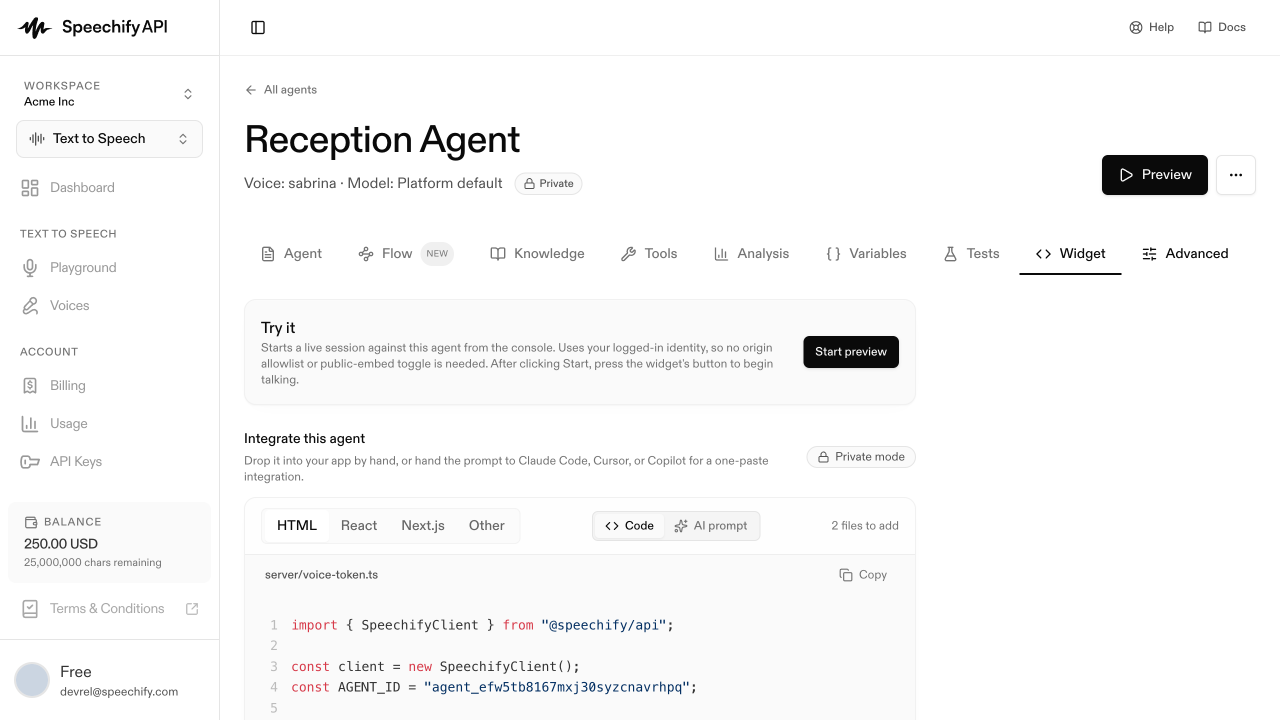
- Widget style - Pill (a collapsed “Talk to agent” that expands) or FAB (a floating action button).
- Theme - Dark, Light, or Auto (follows
prefers-color-scheme). - Avatar - an animated gradient Orb (pick two gradient stops) or a static Image.
- Button copy - override the label for each conversation stage (max 120 chars; leave blank to keep the default).
- Live transcript - render a scrolling transcript inside the widget panel.
- Terms & conditions - an optional consent gate shown before the conversation starts.