

Workspace and members
A workspace is the container for your agents, knowledge bases, phone numbers, conversations, and billing. One user can belong to many workspaces; switch between them from the workspace label at the top of the sidebar.
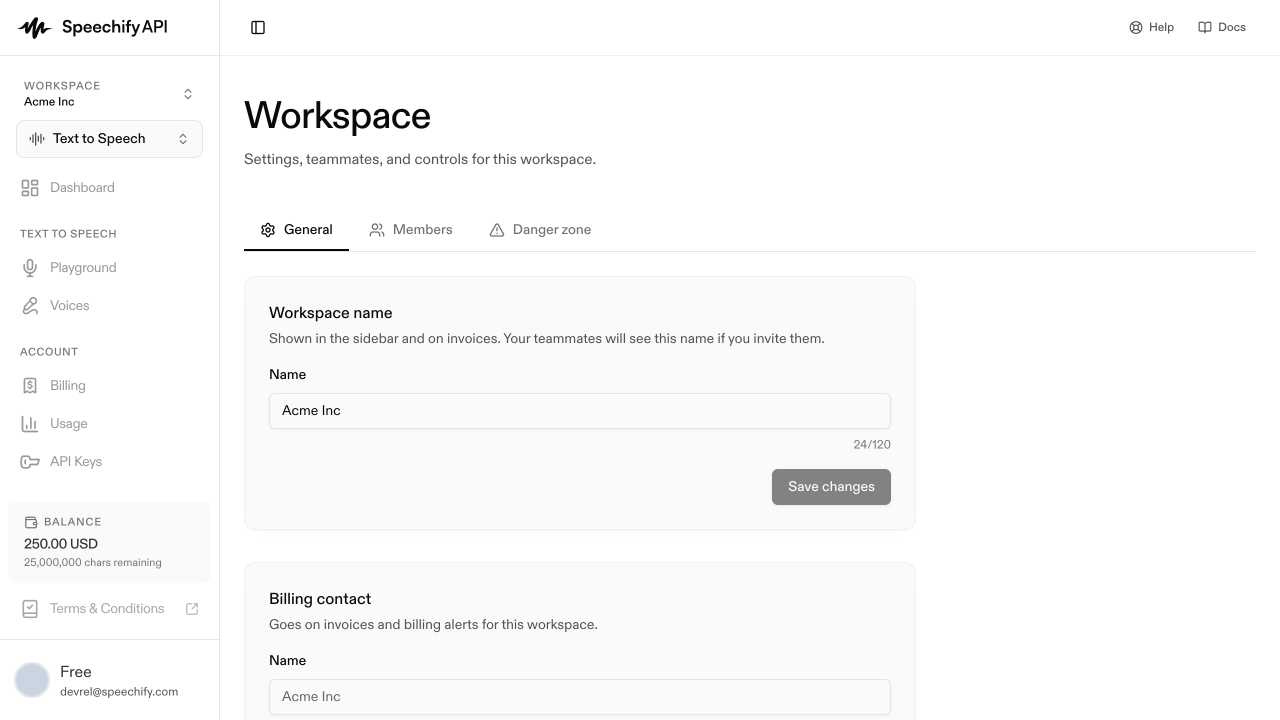
Open workspace settings
Workspace settings live at /settings/workspace, reachable from the workspace switcher dropdown (top of the sidebar) → Workspace settings. There’s no dedicated sidebar item. The page has three tabs: General, Members, and Danger zone.
General
The workspace Name (shown in the sidebar and on invoices) and the Billing contact email (used for invoices and billing alerts) live here. Save with Save changes.
Members
The Members tab shows every teammate and their role.
Every workspace must have at least one owner. The last owner can’t leave or be demoted — promote someone else first.
Invite a teammate
They get an email with a link. When they accept (signing in or up if new), they land in your workspace with the role you assigned.
Switch workspaces
Click your workspace name at the top of the sidebar. The dropdown lists every workspace you belong to — click any to switch. The same dropdown has + New workspace.
Leave or delete a workspace
The Danger zone tab has both:
- Leave workspace — removes you. Blocked if you’re the last owner; promote someone else first.
- Delete workspace — owners only. Soft-delete: it disappears from your switcher and billing stops, but the underlying data is preserved.
You can’t delete or leave your only workspace — create another first.