

Voice and language
Picking a voice
The voice dropdown lists every voice available to your workspace. Click the play icon to hear a sample.
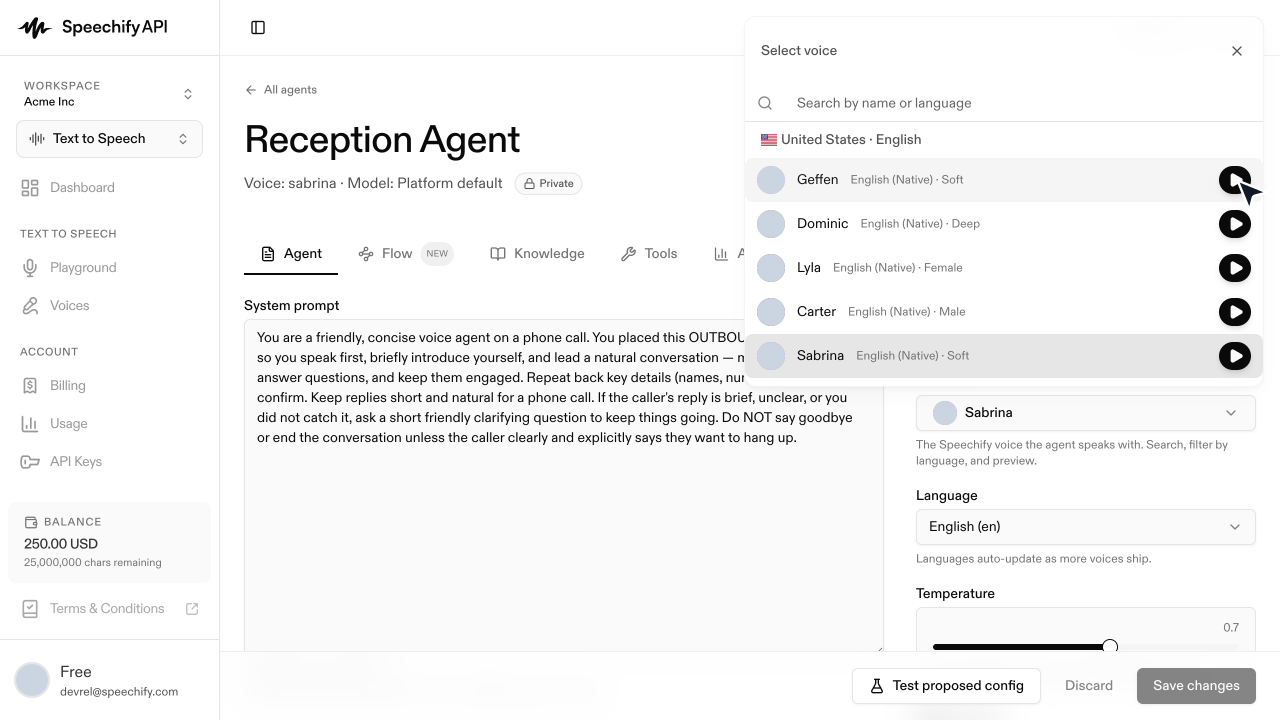
The dropdown shows the curated agent voice catalog — a smaller set than the full TTS voice library. List them programmatically (the same IDs the API accepts when you set an agent’s voice) with GET /v1/agents/voices. Personal and cloned voices are TTS-only and don’t appear here.
Test before you commit:
- Numbers and dates — have the preview read back a phone number or a date; some voices stumble.
- Domain vocabulary — try your brand, medical, or legal terms.
- Long sentences — some voices breathe naturally, others rush. Test with a paragraph from your prompt.
Picking a language
The Language field controls both what the agent understands (speech recognition) and what it speaks (voice synthesis). Pick the language your callers use. For a multilingual audience, the common pattern is one agent and one number per language, with a routing layer or front-line agent forwarding accordingly.
Each voice is tied to a language. Changing the language re-filters the voice list and resets to a default voice for the new language.