

Read a transcript
Every turn of a call as text, with timestamps and speaker labels
Open any conversation from the Conversations list to see its transcript.
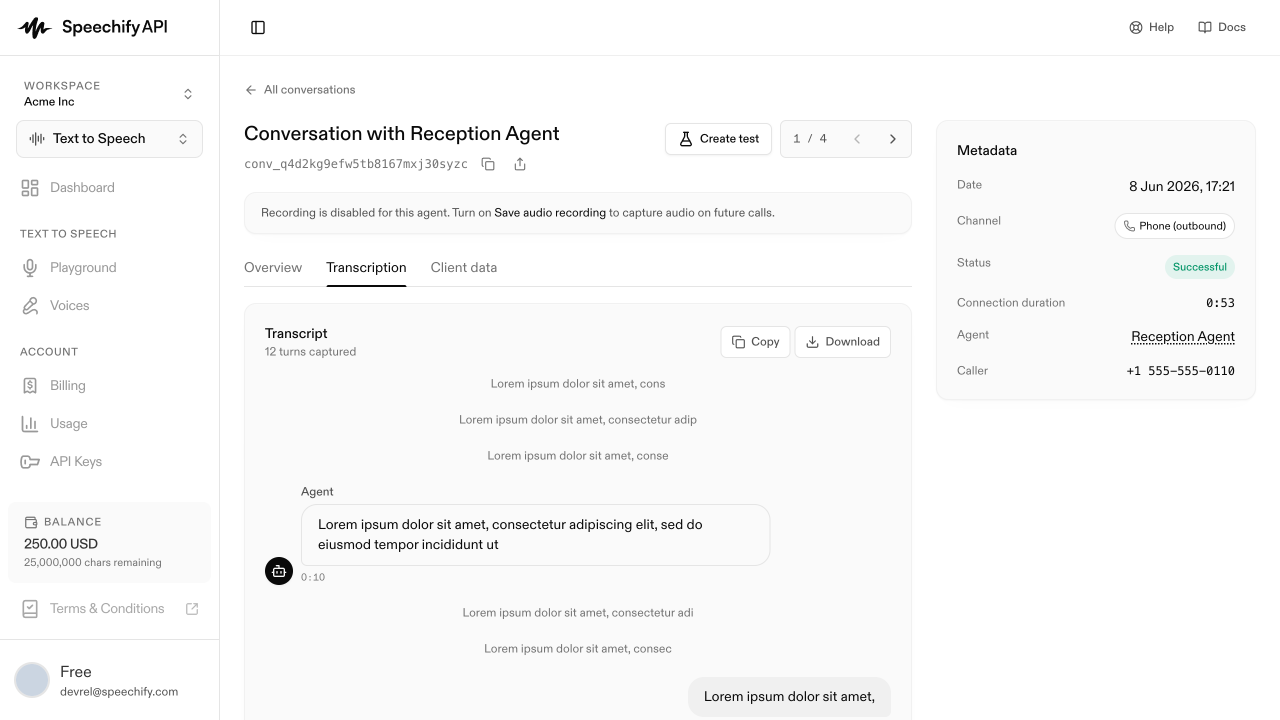
What you see
Each turn is labeled Agent or with the caller’s role, with a timestamp. Long turns aren’t truncated — you see the full text. The right rail shows Metadata: date, channel (Web / phone), status, connection duration, and the agent that handled the call.
What transcripts are good for
- Prompt tuning — when an agent does the wrong thing, the transcript shows exactly what was said. Read a dozen conversations after a prompt change to gut-check the impact.
- Compliance — every spoken word, on the record.
- Training data — copy transcripts into curated Q&A pairs you load back into a knowledge base.
Copy and download
The top of the transcript section has Copy (full transcript to clipboard as plain text) and Download (text file).
Transcripts come from speech recognition. They’re usually accurate but not perfect — proper nouns and domain terms occasionally miss.
Via the API
Fetch every turn of a conversation as structured messages, in started_at order — useful for exporting transcripts into prompt-tuning sets or compliance archives: